


Friday, May 30th, 2014
We’ve announced! Take a look at our project: BattleCry
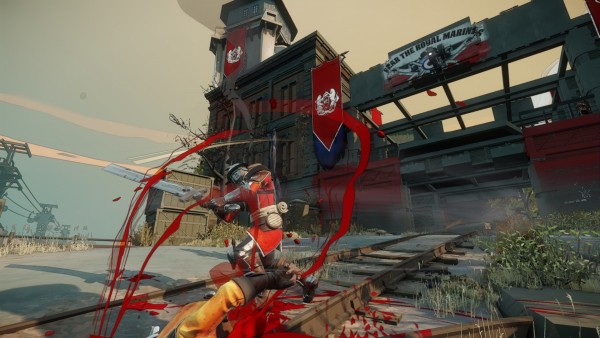
More details soon…
Work continues at BattleCry. We’re doing some really cool stuff, and of course I can’t talk about it. The team here is fantastic, and we’re hiring: BattleCry Studios
So, unannounced projects aside, an unannounced interest entered my life recently: fountain pens. I’ve always been into pens, and I suppose that comes from an early childhood interest in clean handwriting. But through fountain pens, I’ve found a completely new level of depth and subtlety in regular old writing — this was a nice surprise. What makes it so enjoyable? Well there are several things, the first being that I enjoy holding a well crafted object, whatever that may be. The human ingenuity behind carefully controlled capillary action, suction, and seals, is so mechanically poetic! How could I not enjoy these little things? Another fantastic aspect of fountain pens is that you can put whatever inks you want into them, and get a refreshing new look at a pen all over again.
If you’re someone who enjoys writing, I urge you to pick up a fountain pen and try it out. For that matter, drawing with them is great as well. Depending on the ink you have loaded, you can get water-soluble or completely bullet-proof, water resistant effects. Both are desirable in certain circumstances when doing watercolor sketching, so I like to keep a couple pens with both kinds of ink lying around.
Today marked my last day at Certain Affinity.
Leaving was an extraordinarily hard thing to do. As one colleague recently said, it’s “the sanest game studio in Austin.” I leave a great many friends there.
Next week I embark on a new chapter of my career at Battlecry Studios in Austin, a division of ZeniMax Media. It’s a new studio that opened just recently, working on (of course) an exciting, unannounced title.
The job change aside, I’m also in the process of buying a home, and setting up a more permanent homebase in this great city. It’s funny though; this doesn’t seem like as big of a maneuver as leaving CA did. Perhaps it’s because the mountain of debt is invisible, and all of the faces of my beloved colleagues are much more tangible. Sigh.
I know I’ll make fast friends at the new studio, and I’ll get to expose myself (hey-oh) to new technology, write new systems, etc. It’ll be a healthy move, and that’s why I did it. But damn it all, life is bittersweet at times.
…but I can’t talk about it. A few weeks ago Certain Affinity (the company I work for), announced their involvement with developing Halo 4. Needless to say we’re very excited to be a part of such a large milestone in the franchise’s history, and I hope the fans enjoy it. But that’s enough about that; more to come in the next few months.
In other news, I went to Japan last month! A ton of my pictures are posted up on my Japan Flickr album, I hope you enjoy them.
It was an incredible experience—one that I’ve wanted to have for quite some time. The weather was great, the country beautiful. One thing that really amazed me was how almost every plot of empty land was used for growing rice. The plot on the cliff by the train bridge? Rice paddy. The tiny wedge of land by an intersection? Rice paddy. Such an amazingly efficient use of space. Another thing: there doesn’t seem to be any context for what food is appropriate for breakfast or dinner. At the hotels and ryokans I frequented, I ate practically the same food at both times of day: fish, rice, vegetables, picked plums, etc.
I’d love to go back, and have even thought about living there. Unfortunately, from what I’ve read, game developers in Japan are overworked and don’t get paid very well, so that rules that out. Oh, well—certainly a nice place to visit.
Over and out.
Well, things are cruising along at Certain Affinity. I recently finished working on our latest title, Crimson Alliance, which comes to XBLA on 9/7. Go check it out. It’s a fun, Gauntlet-type adventure through a brand new fantasy world. My part on the title was chiefly graphics and particles, and I’m pretty pleased with what we were able to do, given our constraints.
I don’t think I can ever completely remove myself from creating art or writing code entirely, although sometimes I wish I could just to keep things simpler… I was deeply involved in creating particle effects as well as hacking on tools and implementing various systems, like decal generation, threaded particles, and various editors. Oh yea, I’m also growing a crazy mustache:
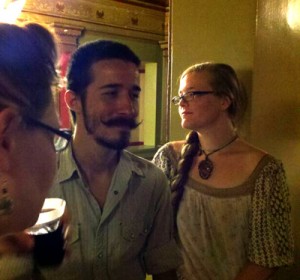
This picture is a little old, so the ‘stache is actually a little bigger than this, now. I never thought I’d enjoy being a “facial hair enthusiast,” as I’ve heard myself called, but it’s actually a kick-ass thing to wear on your face. It’s also a fun social experiment to see how people treat you differently depending on how you look. Most of the time people greet me with pleased excitement, but there are some who seemingly scorn mustaches and who sometimes seem to feel embarrassed for me (aww…). You know, this must be similar to the way normal people feel when they go out dressed like a bum, just to see how people’s perceptions are altered. Wait, is it good or bad that growing a mustache is like pretending to be a bum? Ah, well, fuck it.
Anyways, Crimson Alliance. The game’s pretty neat, and I’m excited to see public reception that is so overwhelmingly positive. It’ll be fun to watch it release.
In closing, I’ve been moved off of that project onto a larger, unannounced title of awesomeness. I can’t talk about it, but suffice it to say that I’m very happy and hard at work.
Next time, I want to tell you about a little game I released a couple of months ago for the iPhone/Android/iPad: Jangle!
So it’s been a while. It usually does take some strange turn of events for me to take stock and update my blog. In this case, I’m staying home with an annoying sore throat, so I figured I’d update with what I’ve been up to lately.
I’ve been having a stimulating time at Certain Affinity, mostly dealing with particles. I’ve essentially taken on the role of particle engine/tools developer as well as being a particle effect creator. It’s great to finally have the freedom to improve the engine that I work in. If I’m creating an effect, the only thing stopping me from getting feature “x” in any given situation is my own time and ability to add said feature to the engine and tools. I’m finding that my own explorations/experimentations with particles in my spare time have really paid off.
I also work on our engine’s deferred renderer, implementing new lights and shaders whenever necessary. It’s fun to do, but there’s less work necessary there than I had hoped, given that we are well into production.
In my spare time, I’ve also been working on an iPhone word game. It’s pretty fun — good enough to play on the toilet. It’s basically a competitive anagram building game, pitting you against an opponent with the same starting letters and seeing who can build the best word. I’ll post more about that as I am able, as we’re just now approaching the time for app submission.
Well it’s official: I’m changing jobs and going to work for Certain Affinity. I’m pretty excited about this move, as I’ll be moving more into a dedicated graphics programming role and doing a little less art asset creation. Also, I’ll be working on much cooler products for the Xbox 360, as opposed to social games with a very different demographic and an often limited scope.
The unfortunate part is the circumstance which arose to catalyse this move. I would never leave a job prematurely unless there were some serious misgivings or misunderstandings between myself and the company, and sadly this was the case with my previous employer. I’ll leave it at that. On the one hand I am very sad to let go of a company which I helped found, and indeed held a not-insubstantial amount of shares in, but in the end it is the heart that matters. I would not have been happy had I not made this move.
But hey, on the positive side, I landed a kick-ass job at a sweet company! I’ll be working with some former co-workers on Dungeon Runners, plus many other talented folks from around the industry. I expect I’ll be learning a lot from my new peers. I can’t wait to dive deeper into my passion for graphics, writing shaders, and streamlining art pipelines.
Working on Dungeon Runners, I had a chance to optimize and improve the graphics pipeline, but only within a limited range. The hardware constraints of our user base required that certain, newer graphical tricks had to be omitted. However, working on the Xbox 360 hardware looks to be truly liberating in that regard. It’s a couple of years old now, but it’s still more capable of doing interesting things graphically than I am used to. I can’t wait to play around more with post-processing, shadows, and lighting models, oh my!
Cheers to new opportunities.
I don’t think that Flash games are very compelling. In fact, most of the time, they are downright awful. This isn’t to say that there aren’t very creative people working on sweet Flash products, it’s just that I can’t remember them.
This latest explosion of Flash games on the social networks is interesting, though. The kind of gamer that they appeal to may never grow out of the phase they’re in. I’ve heard it said in many places that these gamers will and must eventually expect a deeper play experience, but I wonder.
When I think about how my own gaming tastes have evolved, I am startled to see that they haven’t. It’s almost as though whatever genre and mechanics I was initially attracted to have really stayed with me. As a young boy, I loved playing Final Fantasy 2 (US) on my SNES, which started my thirst for compelling RPG’s. I also loved strategy board games which led to my interest in games like Civilization and standard RTS fare.
Although RPG’s have evolved as a genre since Final Fantasy 2, all of the basic mechanics are still there, albeit shuffled around a bit. The only thing that has dramatically changed has been the graphics, UI standards, and playability.
In other words, the games haven’t changed — they’re just easier and more enjoyable to play, with prettier packaging.
So where does that leave games like Farmville or Cafe World? Well, my guess is that the gameplay mechanics will continue to be shallow collection games with doled out rewards with some social hooks. This set of features has been honed, polished, and perfected for a simple reason: it’s like crack. Crackheads don’t want deeper game mechanics, they just want more crack, the same way I just want better RPG’s or RTS games. I don’t expect those mechanics to go away anytime soon.
So, given that the mechanics won’t change much, just graphics, UI, and playability remain. Unfortunately, those are not Flash’s strong points.
I’d love to say that HTML5 will come and deliver us all from these issues, but that technology still feels like it’d be a couple of years before the spec is decided on and has reasonable browser/user penetration. I guess we’ll all have to be patient.
There are some alternatives, of course. The big three that come to mind are: Unity, Instant Action, and the Portalarium Player. All three of these solutions are browser plugins of some kind that essentially run a 3D engine in the web browser, but only the Portalarium Player can run an arbitrary engine of the developer’s choice.
These choices still have the inherent problem of creating another barrier to the game that the poor user will have to navigate through. Hopefully the user’s attention span is long enough to make it, but admittedly the sort of user interested in playing these crack-like games has little to no patience. These platforms do seem ripe for some high-quality content though, and could do quite well if the games targeted the proper demographics.
I’ve been a little too absorbed in game scripting languages and web technologies for my comfort, so I decided to revive an old C++ project of mine, Fern.
Fern was a small particle engine that was highly optimized for SIMD instructions — all particle integrations and operations would happen using the SSE instruction set, so it was pretty quick. However, the problem with this project was that I was starting from a blank slate, and was quickly bogged down writing boring IO, Windows API, and low-level engine functionality. The point of having a code project that you work on in your spare time is that you enjoy what you’re working on, and I quickly found that I didn’t like writing all this stuff.
I went searching around for a nice creative, open-source project for graphics testing, and found Cinder. It’s pretty nice as far as a sandbox for graphics testing goes. It’s multi-platform, but currently only supports OpenGL.
So far I’ve re-written much of my particle code from Fern to use Cinder, and although it’s not quite as fast as Fern, it was working in a matter of hours. I posted an example of the system in my Folio.
Next, I’d like to test out the Cinder FBO and write another pixel convolution kernel to get some blurring going on.
Well Sweet @$! Poker, my new Facebook game, has been live for a month or so now. I have to say, it’s been much slower going acquiring users than anticipated.
The reason for this is clear: Facebook has turned off the most viral of their viral channels, Notifications. And with good reason. Those things were spammy as hell, but they were also what catalyzed early adopters like Zynga to achieve user counts of epic proportions.
I think from here on out it’s going to be much, much harder to acquire users on the Facebook platform without shelling out wads of cash on advertising. This essentially puts developers in the same boat that they were in before the social network boom came along: you have to pay for your users with marketing. But let’s all admit it, it was way too good to last. Meanwhile, Facebook stands to make millions on these huge game companies that have entrenched themselves on their network, because the only way they can retain and acquire new users is through ads. Nice move.
So the question now is, “Will this sort of boom ever happen again?” We have to look towards the likes of MySpace, hi5, and the newly launched Yahoo! social platform. Luckily, all of these networks implement the OpenSocial API, so it shouldn’t be hard to develop an interface to OpenSocial and deploy across all three.
Fun times on the bleeding edge.


